SkillNode
First have an overview of the SkillNode Inspector…
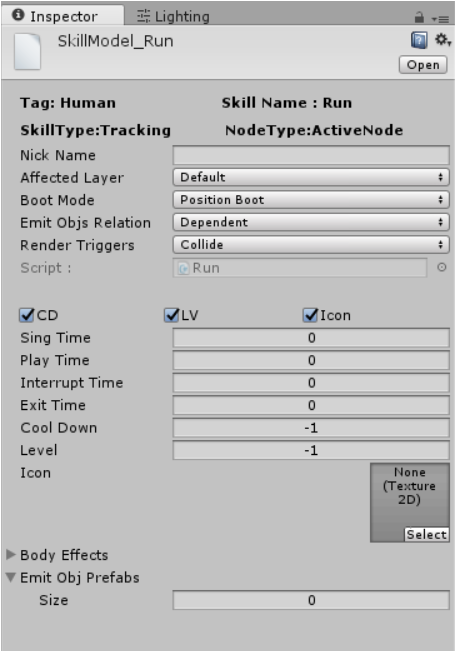
First , you may observe there are so many properties for a skill node.
SkillType and NodeType
I would explain SkillType and NodeType First.
When set SkillType == Directional, it means the EmitObj will
only be emitted to certain position, if SkillType == Tracking,You
should further make use of the EmitUpdate() to ensure tracking. See
the skill example of ghostTrack in the wizard sample.
As mentioned before, if NodeType == ActiveNode,it can should be
triggerd by your trigger script,else if NodeType == PassiveNode,it
will be triggered automatically when it satisfies the condition you
setted and it won’t reply to your command (it’s managed automatically by
the SkillEquipManager ).
Then i would like to talk about the concept EmitObj and
EmitObjPrefabs.
Take the wizard’s expamble again , the fireball emited may collide with other objects on its path to the Goblin, should it boom or not ?
EmitObj and related
EmitObjPrefabs && EmitObjTemps
EmitObjPrefabs and EmitObjTemps are both List<GameObjects>.
EmitObj can be any gameobject that are required to be emitted during the
posscess EmitObjWithITweenof skill casting, such as particle
system, meshes and so on.
EmitObjTemps are generated from EmitObjPrefabs each time the
skill is being cast. EmitObjPrefabs should never be touched during
skill casting, instead, EmitObjTemps is a better choice.
EmitObjTemps will not be automatically destoryed after a skill is
casted in case that developers have any arrangement for them. If not ,
just destroy them manually in OnSkillExiting().
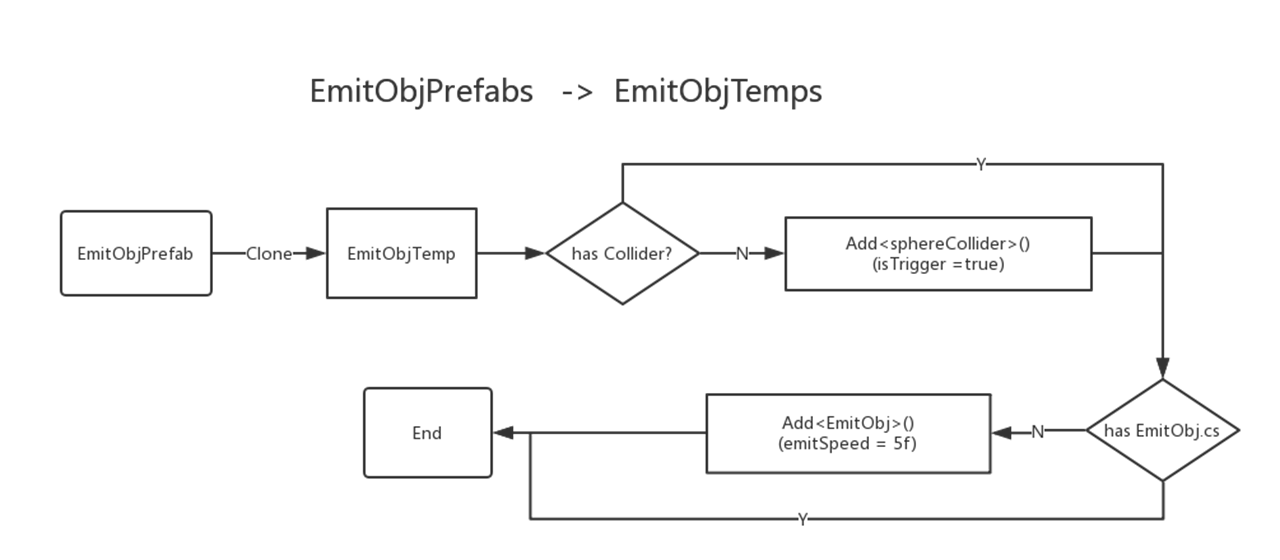
If corresponding EmitObjPrefabs do not have a Collider or
EmitObj.cs attached, EmitObjTemps are guarenteed to have them by
adding a SphereCollider(isTrigger = true) and EmitObj.cs.
Collider component attached on the EmitObjTemps are used to
render objects that are affected by this skill. Collider renders
objects based on its shape,location,AffectedLayer and
RenderTriggers.
Currently only
BoxCollider,Sphere Collider,BoxCollider2Dand
CircleCollider are supported.
BootMode
If the BootMode ==Collision Boot , if the object is in the
Affected Layer(e.g. Enemy), the fireball will be triggered and
goes to next state OnSkillPlaying() for playtime,else if the
BootMode ==Position Boot, it will not be triggered until it arrives
the position it was setted (no matter it’s a directional skill or
tracking skill)
So what’s EmitObj Relation?
EmitObjRelation
Take the wizard’s expamble again , the wizard may emit multiple fireball with different speed at the same time , now the problem is if one fireball was triggered,should the others be triggered?
If Dependent,that means one triggered all , one emitobj triggered
will cause all emitobjs to be triggered.Else(Independent), one
emitobj cannot be triggered by other emit obj.
Now what happened after one fireball was triggered?
The fireball will render the objs inside its collider( BoxCollider or
SphereCollider),and takes them as the input objsto the
OnSkillPlaying(List<GameObject> objs).This function will be called
in every fixedUpdate for the length of PlayTime,as long as one
emitobj is triggered.
RenderTriggers
Render Triggers is just saying wheather the EmitObjTemps will
render triggers( not only collider) if it’s triggered. Collider is
yes, Ignore is no, UseGlobal is not recommended.
When will the EmitObj be triggered?
Note that the emitobj can be triggered in two ways.
BootMode == Position Bootand arrive the positionendPossetted inGetComponent<EmitObj>attached.
Thus, endPos must be setted in EmitObj if it’s a collision boot.
BootMode == Collision Bootand was triggered by some gameobject inAffectedLayer- exceeds the
emitTimesetted in theEmitObj
The condition of entering OnSkillPlaying()
- one of the
EmitObjTempsare triggered EmitObjPrefabs.size == 0
Other properties
Other properties’s meaning can be checked in this table.
| Name | Meaning | Filled |
|---|---|---|
| NickName | Just for a easy recognition(e.g. NickName Boom for Skill fire) | Not Required |
| CD | CoolDown of this skill node | Not Required |
| LV | Level of this skill node | Not Required |
| Icon | Icon of this node | Not Required |
| Sing Time | time of executing OnSkillSinging() |
Required |
| Play Time | time of executing ` OnSkillPlaying(List<GameObject> objs)` | Required |
| Interrupt Time | time of executing OnSkillStopping() |
Required |
| Exit Time | time of executing OnSkillExiting() |
Required |
| Body Effects | Some Effects that may be played on the character during the execution of this skill | Not Required |
How to create a Skill Node?
SkillNode can only be created in a NodeLib.
Open Window-> Skill Lib and dock it.
Assumed you already has a NodeLib tagged Human as following.
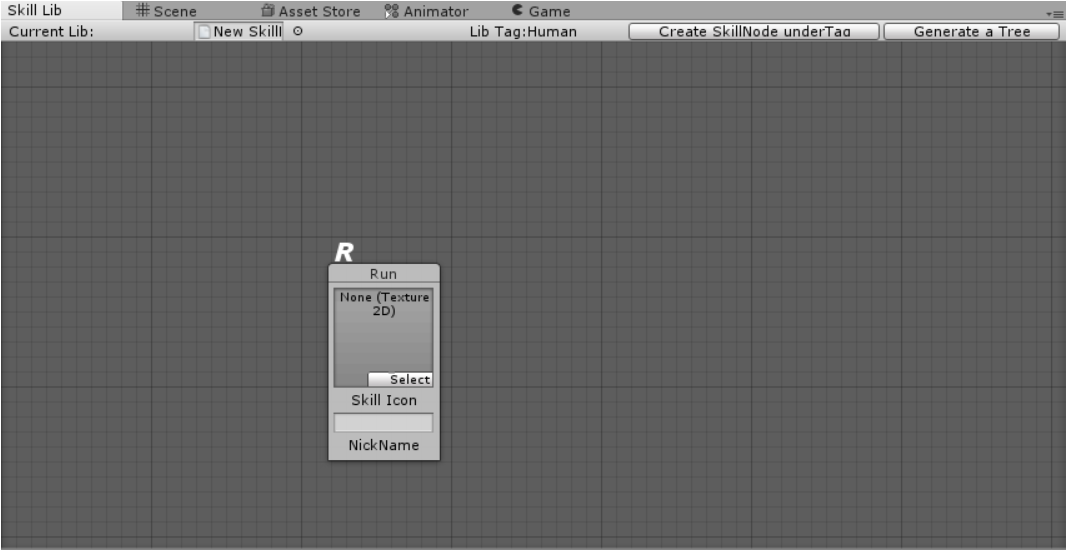
Press Create SkillNode underTag
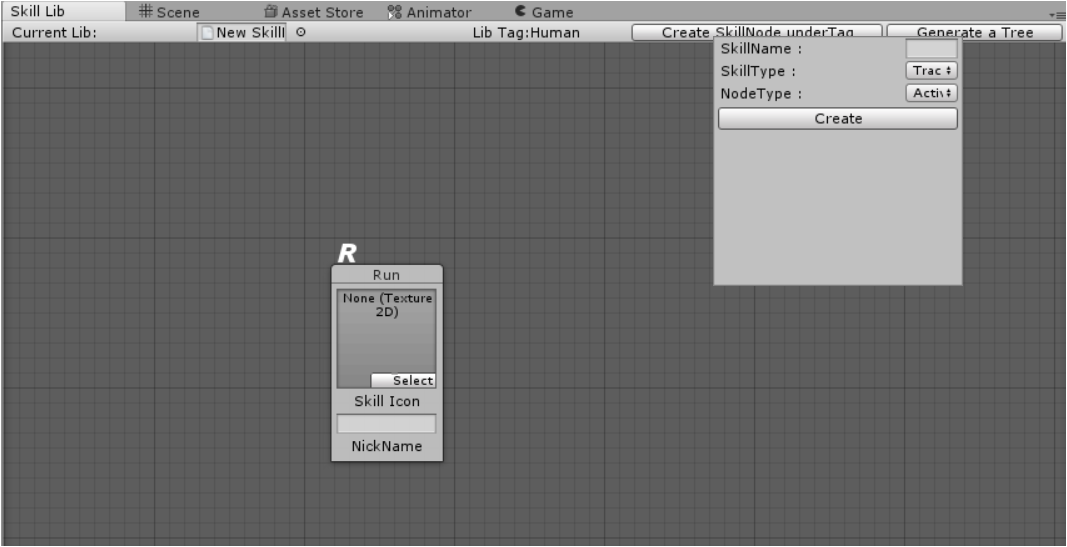
Set the SkillName , SkillType,NodeType.They can only be setted once.
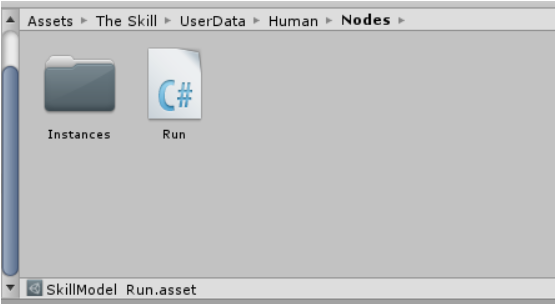
The Node script will be created under the folder
Assets\The Skill\UserData\Human\Nodes with the name Run.cs
The Node object will be created under the folder
Assets\The Skill\UserData\Human\Nodes\instances with the name
SkillModel_Run.asset
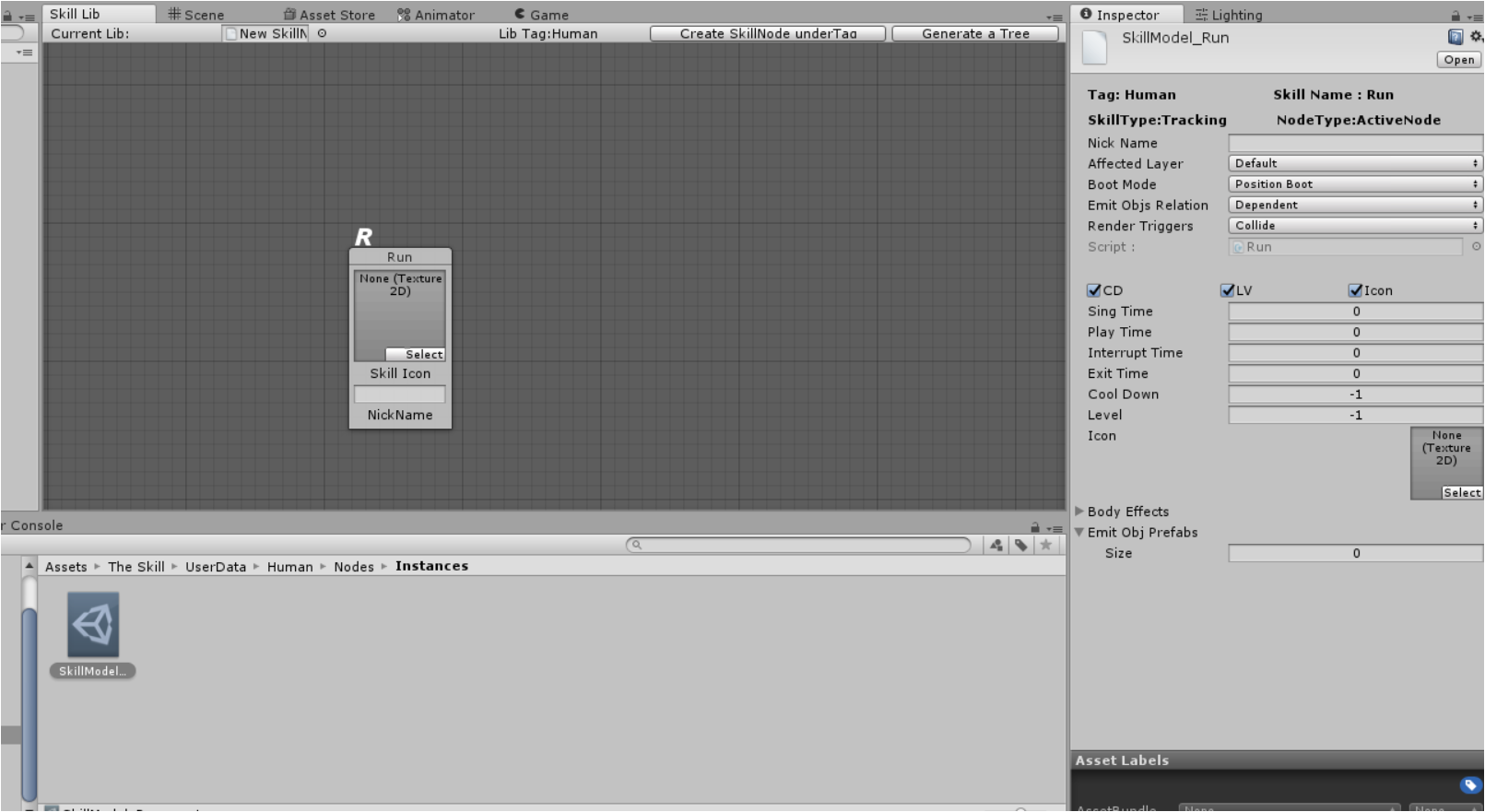
if selected, you can view all the properties in the inspector.
Drag and drop it into the EditorWindow Skill Lib , then the lib will
have this node.
Then we goes to the script.
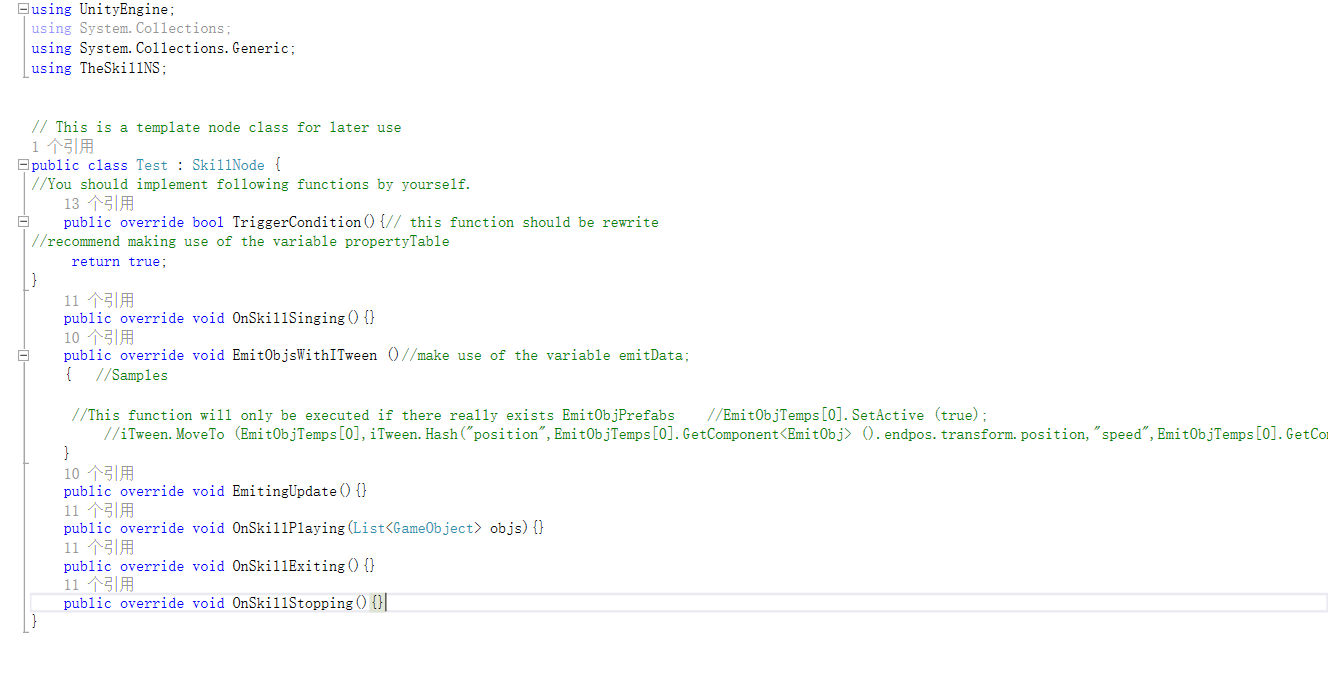
Currently, Test inherits from SkillNode,which means you have all
the functionality above while you can still define how your skillnode
Fly look like.
You can add more variables and functions ,get the AttributeTable by
attributes(which is already defined in the baseClass), get the
gameobject owning this node by attributes.target (then you almost
grasp everything you need in your hand),which is quite handy,right?
You’d better rewrite your TriggerConditon(), e.g to detect wheather
mana enough for this skill.
Notice you should also implement other 5 functions.
I would talk about EmitObjsWithITween().This function will be called
once to emit EmitObjTemps, i recommend using ITween as it’s
powerful and simple enough.
Ever the EmitingUpdate() will execute at a fixedUpdate rate as long
as none of the EmitObjTemps are triggered.
Also i hope you can make use of skillData, which is from
SkillEquipManager.PlaySkill(string skName, Hashtable skillData).
This gives you a lot space to determine what other data you required when playing a skill.